914
914In the digital age, monitors are important output devices for computers, so the selection of their cables is particularly important. This article will introduce in detail the types of monitor cables and how to choose the appropriate monitor cables.
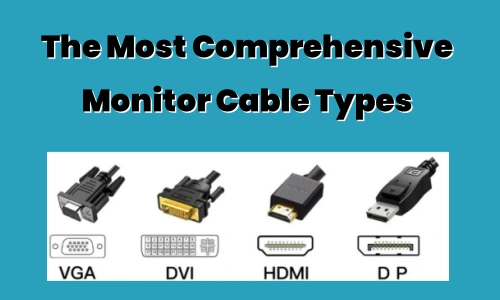
There are various types of monitor connecting cables. Choosing the proper one is critical to maintaining signal quality and stability. When selecting a monitor power cable, you should examine the interface type, transmission speed and resolution requirements, length, quality, and connection stability. With the advancement of science and technology, new interfaces and connecting cables are continually appearing. We must select the appropriate one depending on our specific requirements and device compatibility.
First, you need to choose the appropriate monitor display cable according to the interface type of the monitor. The signal transmission speed, resolution and function supported by the connection cables of different interface types are different, so you need to choose according to actual needs.
If you need to transmit high-definition and high-speed signals, you need to choose a connection cable that supports high bandwidth and high resolution, such as HDMI 2.0 or DisplayPort, etc. If it is just for ordinary use, you can choose a more economical connection cable with interfaces such as HDMI 1.4 or DVI.
The length of the monitor cable is also one of the factors to be considered. If the distance between the monitor and the computer is far, you need to choose a longer cable, but it should be noted that a too long cable may affect the transmission quality and stability of the signal.
When choosing a display cable, you should choose a reliable product. High-quality connection cables have better conductivity, more stable signal transmission and longer service life. You can judge the quality of the product by checking the brand, specifications, certification and other information of the product.
When choosing a monitor connection cable, you also need to pay attention to the stability of the connection. Some poor quality cables may be loose or have poor contact, resulting in unstable signal transmission or failure. When choosing a cable, you should choose products with reliable quality and firm interfaces.
There are many types of monitor display cables. When purchasing a host and a monitor, the interface type is a factor we need to consider. Generally speaking, if one of your monitor or graphics card does not have a DP interface, then the DP interface cannot be used. Of course, if the monitor and graphics card have DP, HDMI, DVI and other interfaces at the same time, in this case, how should you choose the monitor cable? You must have a firm grasp of the basic knowledge of mainstream interfaces to avoid wasting money.
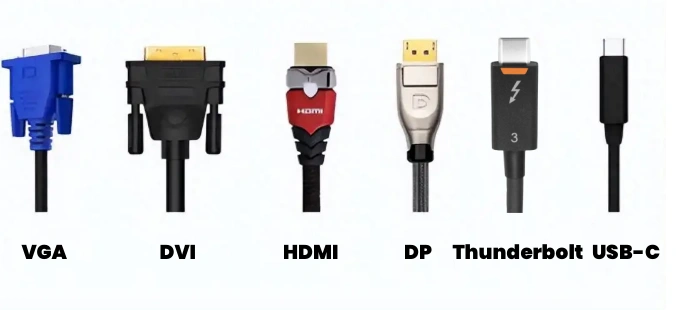
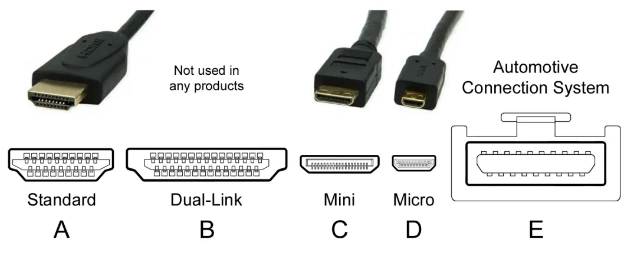
HDMI is one of the most popular interfaces nowadays. It can realize synchronous output of audio and video and maintain high-definition quality when transmitting videos of different resolutions. Currently, common home TVs, set-top boxes, computer graphics cards, and display devices are equipped with HDMI interfaces.
The common HDMI versions at present are: 1.4/2.0, 2.1HDMI1.4: can support 4K (3840*2160), but because the bandwidth is only 10.2Gbps, it can only reach 30 frames per second at 4K resolution.
HDMI2.0: The bandwidth is upgraded to 18Gbps, which can support 4K (3840*2160) 60 frames output. And 10bit color depth, the color has better layering than the 1.4 version, and supports hot plugging.
HDMI2.1: This standard provides 48Gbps bandwidth, supports up to 8K (7680*4320) 60Hz and 4K120Hz output, and the color depth is up to 12Bit.
Advantages
Disadvantages
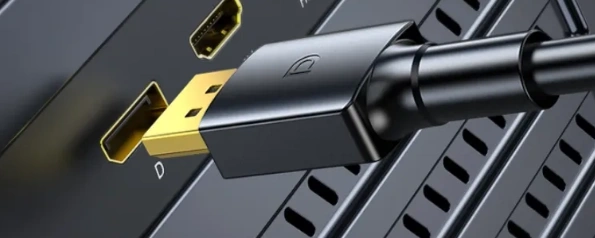
DP is high-definition video plus audio transmission. Compared with HDMI, DP has stronger anti-interference ability and larger bandwidth. Supports higher resolution and refresh rate.
Currently, the DP cables on the market are generally 1.2 and 1.4 versions.
DP1.2: The bandwidth is 21.6Gbps, supports up to 4K60Hz output, and only supports 8bit color depth.
DP1.4: The bandwidth is upgraded to 32Gbps, supports up to 8K60Hz and 4K120hz output, and supports 10bit image transmission, HDR dynamic image transmission, and supports DSC, FEC and other technologies to eliminate screen tearing and freezes, bringing a clearer and smoother picture experience.
Advantages:
Disadvantages:
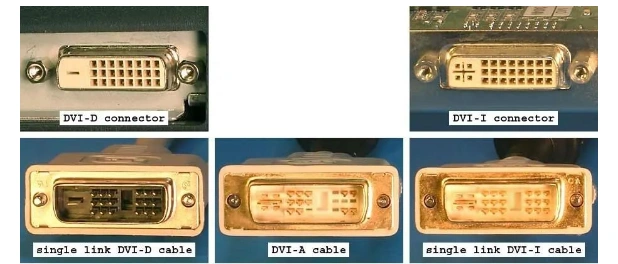
The DVI interface transmits digital signals, but there is no audio. There are three types of DVI interfaces: DVI-I can transmit both digital and analog signals, DVI-D can transmit digital signals, and DVI-A can only transmit analog signals. The most commonly used one is the DVI-I interface.
DVI-A (12+5 pins): It is generally used in monitors with a resolution of less than or equal to 1080P (1920*1080).
DVI-D (24+1 pins): It can only accept digital signals. This connector does not support analog signals and has basically the same performance as the previous one.
DVI-I (24+5 pins): It is compatible with the first two interfaces, that is, it can be compatible with both analog and digital models. And it supports higher resolutions than the first two.
Advantages:
Disadvantages:
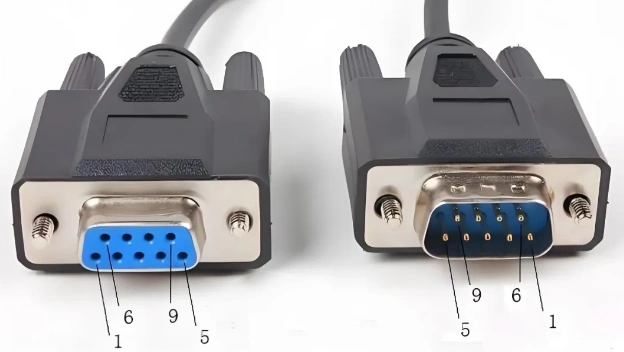
Although the VGA interface is on the verge of being eliminated, many entry-level 1080P monitors on the market still use this interface. Since the VGA interface transmits analog signals, it is very easy to cause signal loss and reduce picture quality. It also cannot transmit audio signals.
Advantages:
Disadvantages:
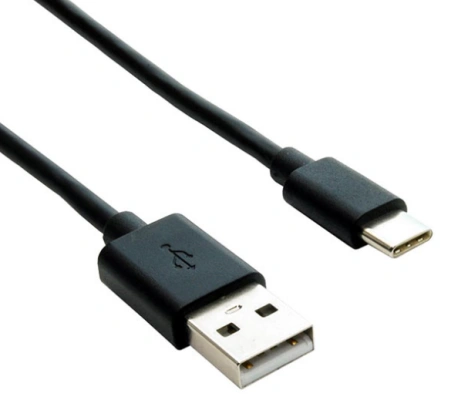
The USB-C interface is a full-featured interface that was created with the update of the type-c interface. Compared with the above types, it has many conveniences, such as supporting reversible plugging and unplugging, and being more compact.
This video cable not only supports 4K high-definition audio and video transmission, but also supports 5A current, which can charge devices that support the C port, such as MacBook or mobile phones. At the same time, it supports transmission speeds above 10Gbps and can also transmit data.
Advantages:
Disadvantages:
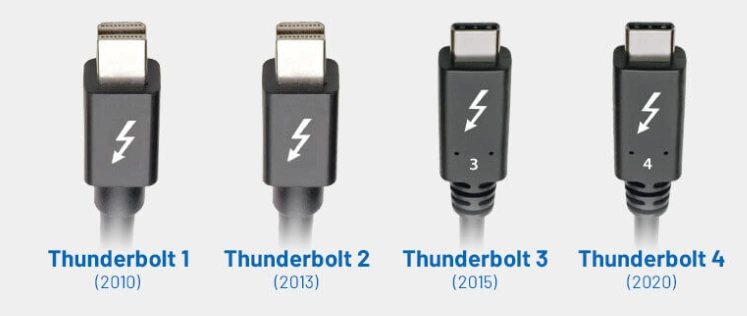
In order to compete with the USB interface, Intel led the development of the Thunderbolt interface. Due to its high copyright licensing fees, it has not been popularized. Only Apple Mac computers and a few high-end motherboards support this interface. Thunderbolt high-speed interface, supports video, audio and data transmission, mostly used in Mac devices.
Advantages:
Disadvantages:
HDMI has a higher bandwidth, while VGA has a lower bandwidth. Therefore, HDMI is better than VGA. The bandwidth of HDMI is for digital signals, while VGA is for analog signals; these are two different transmission technologies. If we want to compare them, we can do so under the same resolution conditions, such as high definition. HDMI requires a bandwidth of 2.2 GHz, whereas VGA only needs 172 MHz. However, a higher bandwidth does not necessarily mean that HDMI transmits more video signals; this is simply due to the differences in transmission technologies.
These three are not equivalent. HDMI and VGA are both signal transmission methods, while high-definition refers to a video resolution. HDMI supports high-definition, and VGA also supports it. HDMI2.0 currently supports up to 3840*2160 resolution high-definition format, and can support 4k. VGA supports various resolutions from 640*480 to up to 2560*1600, but VGA is easily interfered by other signals, so the high-definition resolution looks a bit virtual. In order to avoid interference with the picture, the VGA interface can be used below 1920*1080P resolution.

Disclaimer: The views and opinions expressed by individual authors or forum participants on this website do not represent the views and opinions of Chipsmall, nor do they represent Chipsmall's official policy.

share this blog to:


Chipsmall will provide you real-time product updates, limited-time deals.


Copyright © 2004-2026 Chipsmall.com All Rights Reserved.

Feedback
We appreciate your engagement with Chipsmall's products and services. Your opinion matters to us! Kindly take a moment to complete the form below. Your valuable feedback ensures that we consistently deliver the exceptional service you deserve. Thank you for being part of our journey towards excellence.